
Here’s how it works, start to finish.
Simple to set up and easy to return to. No account. No subscription.
How your file is organized.
Your Plan sits on top. The three rooms hold everyday life. The tools keep it standing — and the optional add-ons give you room to grow.
- Your PlanThe roof · what to do firstEmergency Info, Hospital Plan, Disaster Plan, Trusted Person Plan, If You’re Reading This
- People & ContactsRoom one · who to callHousehold & Family, Trusted Helpers, School & Activities, Professionals
- Home & PropertyRoom two · how it runsHomes, Access & Safety, Utilities, Vehicles, Pets, Maintenance
- Money & RecordsRoom three · where things are keptAccounts, Bills & Services, Insurance, Documents, Dates — link each document to the account, policy or professional it belongs to
- ToolsThe foundation · what keeps it standingSetup Guides, Print & Share, Review & Backup
- Add-ons (optional)The chimney · room to growAdditional Households & Caregivers, Final Wishes & Legacy Planning, Digital Estate
Four simple steps.
One is getting Life on Track onto your device. The other three are the ones Life on Track shows you on its Home screen — Start, Protect, Share.
Download it
Installed on your device. No App Store.
See step 1 ↓Start
Add the people, instructions, and document locations you know now.
See step 2 ↓Protect
Create a Backup Copy and keep it somewhere safe.
See step 3 ↓Share
Prepare a Trusted Person Packet. Sharing it is always your choice.
See step 4 ↓Buy once. Install it from our website.
After your one-time purchase, you install Life on Track straight onto your device — like an app, but with no App Store and no account to create. Installing comes first, before you add anything private.
The Family Readiness Toolkit is $149, paid once. Choose only the add-ons you need, or get the Toolkit and all three add-ons in the Complete Family Bundle for $249. Compare options →
What installing from our website means:
- An icon on your home screen or desktop
- Works offline once installed and activated
- Works on phone, tablet, Mac, or PC
You don’t start from a blank page.
Every section tells you what to consider, and the Interactive Sample shows you what a filled-in one looks like.
Guided Setup is the place to begin: eleven short steps covering you, your emergency contacts, your trusted person, home access, and one key paper. Everything is optional except your name, and you can stop and come back whenever you like.
Good enough today is a fine start.
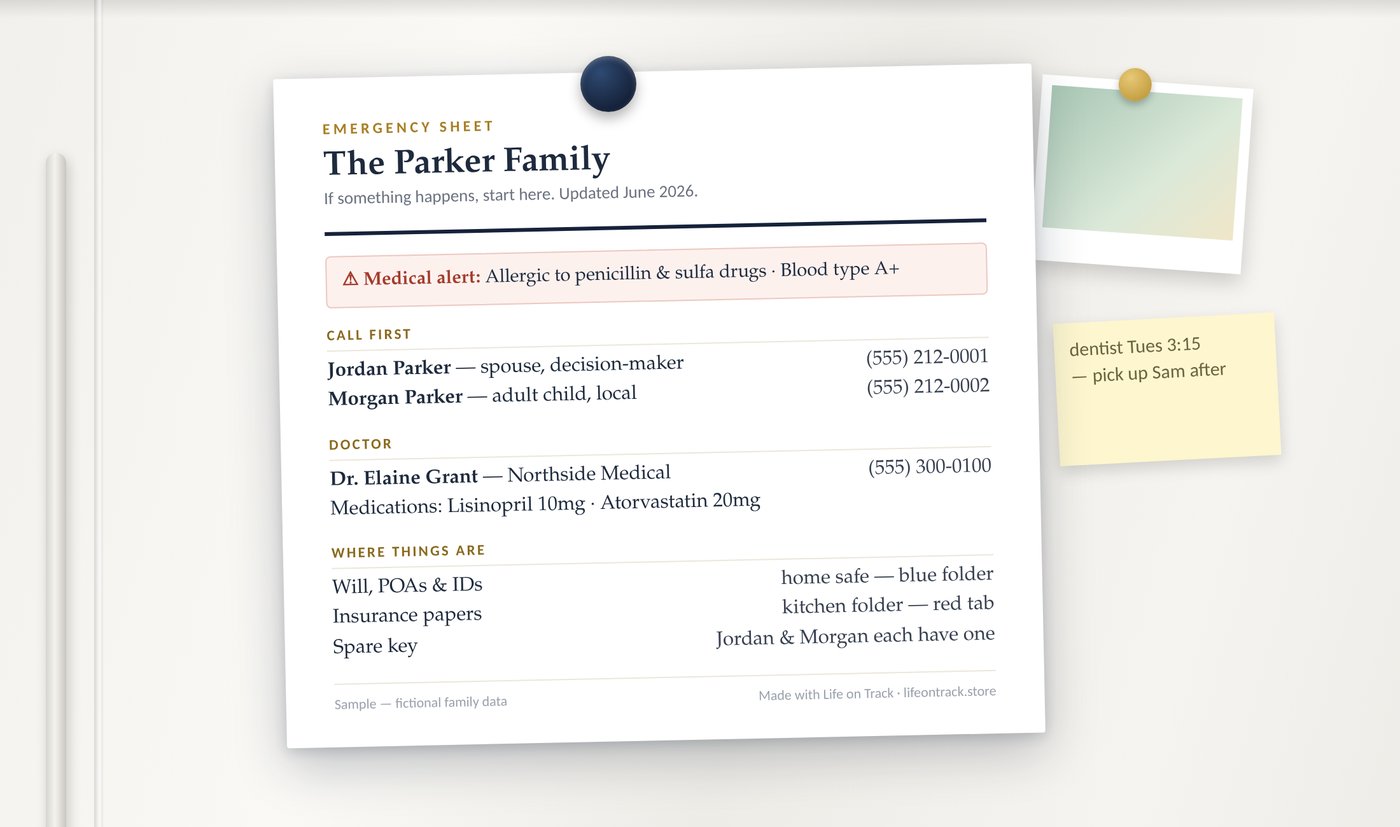
On your device, and backed up wherever you choose.
Protect means one thing: make a Backup Copy, and keep it somewhere separate from your device. Your file lives on your device, so where the backup lives is your decision, not ours.
Back up to the cloud, if you want
Save your backup to a cloud service you already use — Google Drive, iCloud, Dropbox, wherever. Your account, your choice. Life on Track doesn’t access it.
Or keep it fully offline
Prefer nothing in the cloud? Back up to a USB drive or an external disk and keep your file entirely in your own hands.
Not sure it would hold up? Review & Backup keeps short check-ups on hand, and Settings has a safe, read-only test that opens your backup without changing anything, so you can practice a restore before you need one.
Private because you control the backup.
This is what all of it turns into.
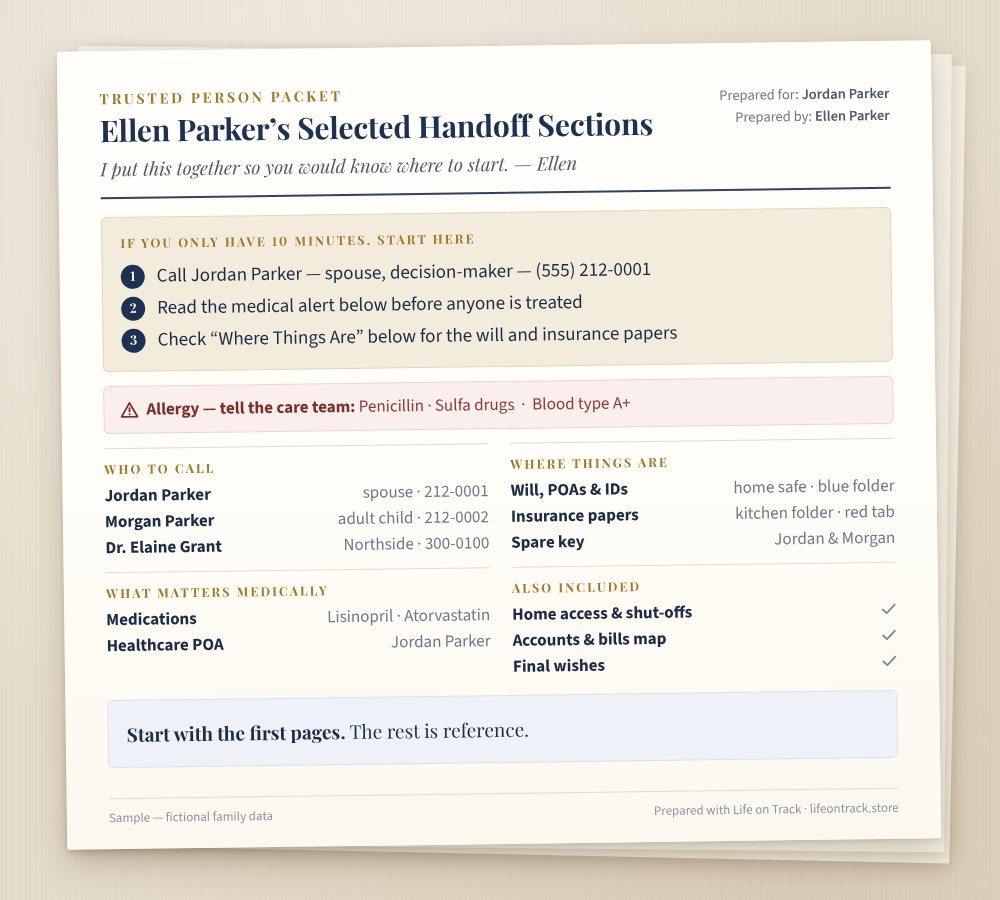
One moment: someone you trust needs your file, and they know where to start, without searching.
In Life on Track this step is called Share, but preparing a Trusted Person Packet is not the same as sending it. You decide whether, when and how they receive it — hand it over printed, email the PDF, or share it from your own cloud.
Then you just use it.
Once it is set up, it is simply a file you open. Because the insurance is due. Because the sitter needs the alarm instructions. Because the school wants the same form it wanted last August, or nobody can remember which doctor your mother saw in the spring.
None of that is preparing for anything — it is a household running. And it is the thing that quietly keeps the file true, so the harder question already has an answer waiting.
If you ever want a hand, Setup Guides holds short, focused guides you can open in any order, and twice a year a reminder on Home invites you to review each household and update anything that has changed.
Your information stays with you.
Your Life on Track file is stored on your device, and you control your own backup. Life on Track does not collect your household information — no household details, health notes, documents, care instructions, or final wishes. Checkout and website activity may be handled by third-party services.
Shared only with the people you choose.
- No account required to build your file
- You decide what to print, back up, or share
What Life on Track is, and is not.
It is
- A private household command center
- A place to look things up in an ordinary week
- A guided family information file
- Easy to print, back up, and hand off
It is not
- A password manager
- A legal or estate-planning service
- A medical record system
- A cloud storage vault
For legal, medical, financial, or tax decisions, speak with a qualified professional.
Start with what you know today.
Add the rest at your own pace.
Choose the Family Readiness Toolkit for your own household, or get the Toolkit and all three add-ons with the Complete Family Bundle. Either way, your family knows where to start.